安全帽是建筑、工地等场景保护工人安全的重要装备,但部分人员难免会有疏忽未佩戴的情况,且人工巡查难以全程监管。安全帽识别技术可智能检测工人佩戴情况,有效提升安全生产监管水平。本文将在飞腾派上部署目标检测算法,用于实时检测人员佩戴安全帽的情况。
飞腾派检测安全帽应用教程
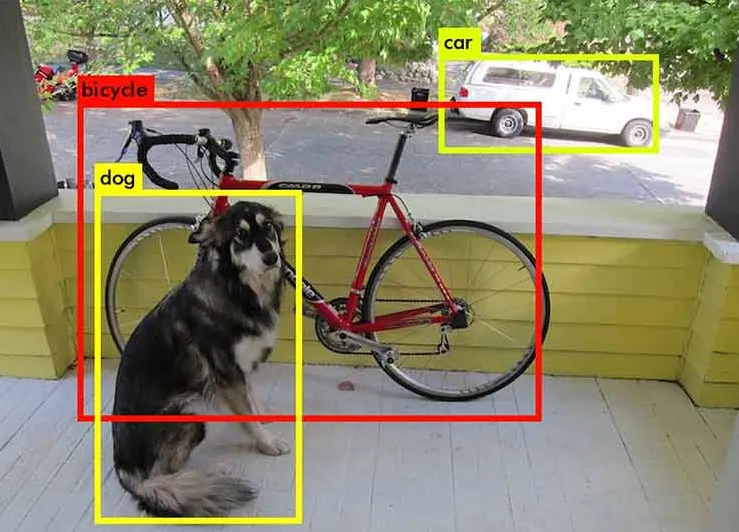
目标检测是计算视觉中一项常见的任务,其具体是指将检测图像中目标目标,并用带标签的边界框框出来。(如下图所示),本次教程将会用YOLO作为安全帽识别的检测算法。
 项目准备
项目准备
硬件规格:飞腾派
操作系统:飞腾OS
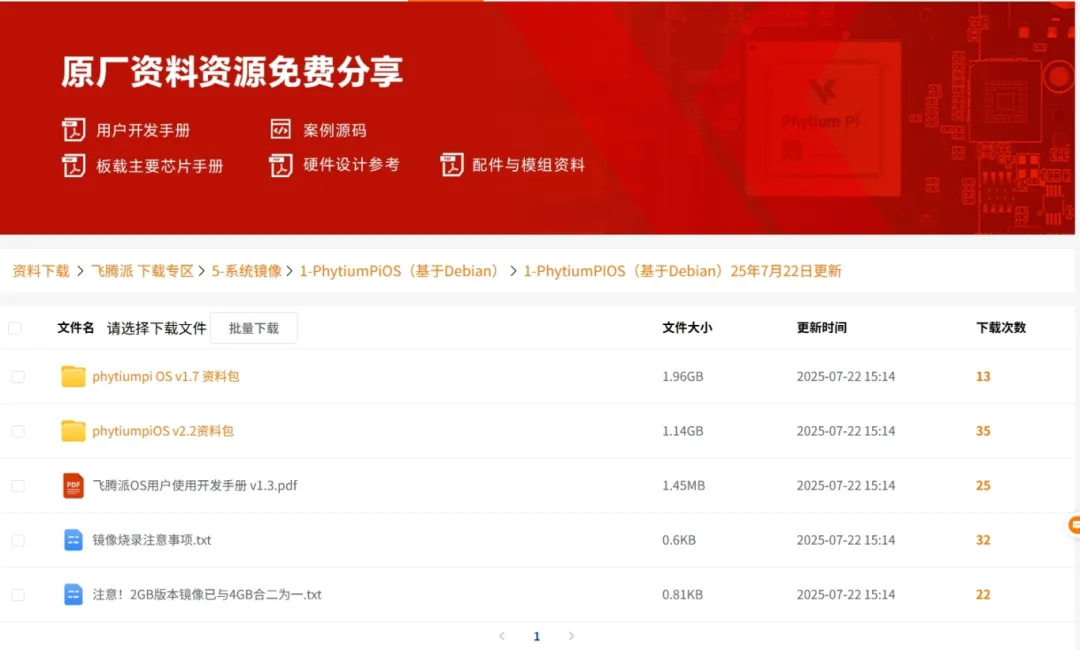
飞腾派OS系统下载:
https://www.iceasy.com/cloud/Phytium?pid=1877647545995448322
安装PyTorch
使用Win + x,唤起开始菜单,选择运行,键入pwsh,进入powershell。进入miniconda安装位置,激活conda
$cd D:\miniconda\shell\condabin$ .\conda-hook.ps1$ conda activate base
创建torch环境
(base) PS C:\Users> conda create --name tf python=3.10(base) PS C:\Users> conda activate torch(torch) PS C:\Users>
安装PyTorch并验证
(torch) PS C:\Users> conda install pytorch torchvision torchaudio pytorch-cuda=12.1 -c pytorch -c nvidia(torch) PS C:\Users> python -c"import torch; print(torch.cuda.is_available())"True
安装Ultralytics
(torch) PS C:\Users> python -m pip install ultralytics -i https://mirror.baidu.com/pypi/simple
转换数据
本文使用百度AI Studio提供的安全帽数据集,转换代码如下:
import osimport refrom tqdm.auto import tqdmfrom shutil importcopyimport yamlimportxml.etree.ElementTree as ETdef convert_box(size, box): """ convert into (x, y, w, h) from (xmin, ymin, xmax, ymax) """ dw, dh = 1. / size[0], 1. / size[1] x, y, w, h = (box[0] + box[1]) / 2.0 - 1, (box[2] + box[3]) / 2.0 - 1, box[1] - box[0], box[3] - box[2] return x * dw, y * dh, w * dw, h * dhdef convert_label(path, lb_path, year, image_id): in_file = open(path / f'VOC{year}/Annotations/{image_id}.xml') out_file = open(lb_path, 'w') tree = ET.parse(in_file) root = tree.getroot() size = root.find('size') w = int(size.find('width').text) h = int(size.find('height').text) names = list(yaml['names'].values()) # names list for obj in root.iter('object'): cls = obj.find('name').text if cls in names andint(obj.find('difficult').text) != 1: xmlbox = obj.find('bndbox') bb = convert_box((w, h), [float(xmlbox.find(x).text) for x in ('xmin', 'xmax', 'ymin', 'ymax')]) cls_id = names.index(cls) # class id out_file.write(" ".join([str(a) for a in (cls_id, *bb)]) + '\n')# Pathto images and annotationspath_images = "./HelmetDetection/images/"path_annot = "./HelmetDetection/annotations/"target_dir = "./dataset"# GetallXML file paths in path_annot and sort themxml_files = sorted( [ os.path.join(path_annot, file_name) for file_name in os.listdir(path_annot) if file_name.endswith(".xml") ])# Getall JPEG image file paths in path_images and sort themjpg_files = sorted( [ os.path.join(path_images, file_name) for file_name in os.listdir(path_images) if file_name.endswith(".jpg") ])# split datasetratio = 0.8N = len(xml_files)train_set = xml_files[:int(N * ratio)]val_set = xml_files[int(N*ratio):]dataset = { "train": train_set, "val": val_set}# convert cococlass_ids = [ "helmet", "head", "person",]class_mapping = dict(zip(range(len(class_ids)), class_ids))for k, v in dataset.items(): for xml_file in tqdm(v): tree = ET.parse(xml_file) root = tree.getroot() image_names = root.find("filename").text # write coco label label_txt = re.sub("png", "txt", image_names) out_file = open(f"{target_dir}/labels/{k}/{label_txt}", 'w+') size = root.find('size') w = int(size.find('width').text) h = int(size.find('height').text) for obj in root.iter("object"): cls = obj.find("name").text xmlbox = obj.find('bndbox') bb = convert_box((w, h), [float(xmlbox.find(x).text) for x in ('xmin', 'xmax', 'ymin', 'ymax')]) cls_id = class_ids.index(cls) # class id out_file.write(" ".join([str(a) for a in (cls_id, *bb)]) + '\n') copy(os.path.join(path_images, image_names), os.path.join(target_dir, 'images', k, image_names)) out_file.close()
转换之后,数据集格式如下:
dataset|--- images |--- train |--- xx.png|--- val |--- xx.png|--- labels |--- train |--- xx.txt|--- val |--- xx.txt
训练YOLOv8模型
创建数据集描述文件helmet.yml,helmet.yml描述了数据集的存放位置以及数据类别信息
train:C:/Users/dataset/images/train # train images (relative to 'path') 4 imagesval:C:/Users/dataset/images/val # val images (relative to 'path') 4 imagestest: # test images (optional)# Classesnames: 0:helmet 1:head 2:person
模型训练
$ yolo task=detect mode=train model=yolov8n.pt data=C:/Users/helmet.yml device=0 batch=16 epochs=50Epoch GPU_mem box_loss cls_loss dfl_loss Instances Size 1/10 1.24G 1.624 1.789 1.276 31 640: 100%|██████████| 500/500 [00:57<00:00, 8.62it/s] Class Images Instances Box(P R mAP50 mAP50-95): 100%|██████████| 63/63 [00:09<00:00, 6.52it/s] all 1000 5272 0.867 0.492 0.534 0.302 Epoch GPU_mem box_loss cls_loss dfl_loss Instances Size 2/10 1.35G 1.548 1.206 1.239 18 640: 100%|██████████| 500/500 [00:53<00:00, 9.37it/s] Class Images Instances Box(P R mAP50 mAP50-95): 100%|██████████| 63/63 [00:09<00:00, 6.77it/s] all 1000 5272 0.919 0.515 0.575 0.318 Epoch GPU_mem box_loss cls_loss dfl_loss Instances Size 3/10 1.34G 1.525 1.058 1.234 30 640: 100%|██████████| 500/500 [00:49<00:00, 10.05it/s] Class Images Instances Box(P R mAP50 mAP50-95): 100%|██████████| 63/63 [00:08<00:00, 7.32it/s] all 1000 5272 0.928 0.528 0.587 0.335 Epoch GPU_mem box_loss cls_loss dfl_loss Instances Size 4/10 1.33G 1.498 0.9742 1.218 42 640: 100%|██████████| 500/500 [00:49<00:00, 10.05it/s] Class Images Instances Box(P R mAP50 mAP50-95): 100%|██████████| 63/63 [00:08<00:00, 7.66it/s] all 1000 5272 0.928 0.535 0.592 0.322 Epoch GPU_mem box_loss cls_loss dfl_loss Instances Size 5/10 1.33G 1.489 0.9235 1.214 30 640: 100%|██████████| 500/500 [00:47<00:00, 10.59it/s] Class Images Instances Box(P R mAP50 mAP50-95): 100%|██████████| 63/63 [00:08<00:00, 7.49it/s]
导出tflite模型
安装依赖项
$ python -m pip install tensorflow>2.4.1 onnx>=1.12.0 onnxsim>=0.4.1'sng4onnx>=1.0.1''onnx_graphsurgeon>=0.3.26'\$'onnx2tf>=1.15.4,<=1.17.5''tflite_support''onnxruntime' -i https://mirror.baidu.com/pypi/simple
导出模型
$ yolo exportmodel=./runs/detect/train/weights/best.pt format=tflite
模型已部署,现在让飞腾派检测安全帽吧!
安装Ultralytics
user@phytiumpi:~/Documents/cv/dl$ python -m pip install ultralytics -i https://mirror.baidu.com/pypi/simple
推理
user@phytiumpi:~/Documents/cv/dl/yolo$ yolo detect predict model=/home/user/Documents/cv/dl/yolo/best_float16.tflite source=/home/user/Documents/cv/dl/yolo/hard_hat_workers1.pngUltralytics YOLOv8.0.196 🚀 Python-3.9.2 torch-2.1.0 CPU (aarch64)Loading /home/user/Documents/cv/dl/yolo/best_float16.tflite for TensorFlow Lite inference...INFO: Created TensorFlow Lite XNNPACK delegate for CPU.image1/1 /home/user/Documents/cv/dl/yolo/hard_hat_workers1.png: 640x640 9 helmets, 959.0msSpeed: 17.2ms preprocess, 959.0ms inference, 6.7ms postprocess per image at shape (1, 3, 640, 640)Results saved to runs/detect/predict
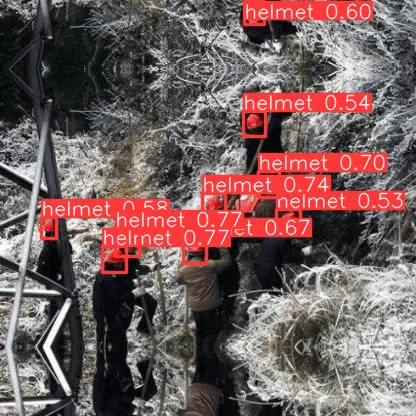 结果可以看到即使在人多聚集的地方,飞腾派也能成功的识别安全帽!