 开源社区
开源社区 
CEM5881-M11 是一款基于 24GHz CW 调制的微型毫米波雷达模块,专为隐蔽式人体感应场景设计,支持串口/IO 双模式输出,可穿透非金属外壳实现运动检测与微动检测
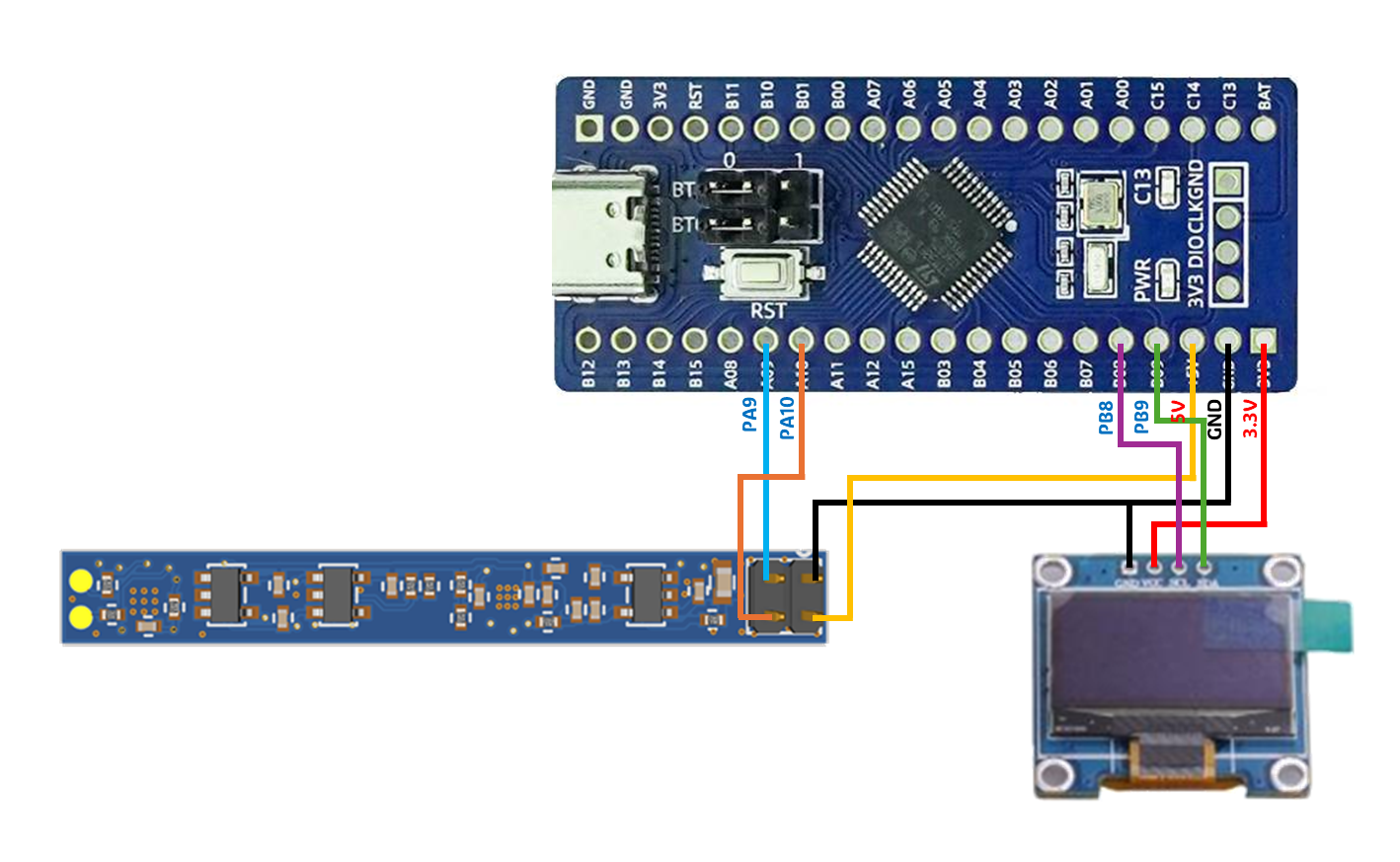
硬件连接
核心功能实现
串口数据解析
由于雷达发送的是格式化 ASCII 文本,我们使用 sscanf 函数。它像正则表达式一样,可以从复杂的字符串中精准提取数字。
- 目标格式:v=%f km/h, str=%d
- 关键点:必须识别到 \r\n (0x0D, 0x0A) 才触发解析,以确保数据帧完整。
坐标系转换逻辑
OLED 屏幕左上角为 (0,0)。为了让波形看起来自然,我们需要进行数学转换:
- 比例尺:1km/h对于的像素高度。
- 零点平移:将速度 0 的位置设在屏幕中间(y=38)。
- 公式: y_{screen} = y_{zero} - (v_{speed} \times scale)
完整代码实现
串口初始化
uint8_t RxBuffer[64];
uint8_t RxIdx = 0;
uint8_t DataReady = 0;

void USART1_Init(uint32_t baudrate) {
    GPIO_InitTypeDef GPIO_InitStructure;
    USART_InitTypeDef USART_InitStructure;
    NVIC_InitTypeDef NVIC_InitStructure;

    RCC_APB2PeriphClockCmd(RCC_APB2Periph_USART1 | RCC_APB2Periph_GPIOA, ENABLE);

    // TX: PA9, RX: PA10
    GPIO_InitStructure.GPIO_Pin = GPIO_Pin_9;
    GPIO_InitStructure.GPIO_Mode = GPIO_Mode_AF_PP;
    GPIO_InitStructure.GPIO_Speed = GPIO_Speed_50MHz;
    GPIO_Init(GPIOA, &GPIO_InitStructure);

    GPIO_InitStructure.GPIO_Pin = GPIO_Pin_10;
    GPIO_InitStructure.GPIO_Mode = GPIO_Mode_IN_FLOATING;
    GPIO_Init(GPIOA, &GPIO_InitStructure);

    USART_InitStructure.USART_BaudRate = baudrate;
    USART_InitStructure.USART_WordLength = USART_WordLength_8b;
    USART_InitStructure.USART_StopBits = USART_StopBits_1;
    USART_InitStructure.USART_Parity = USART_Parity_No;
    USART_InitStructure.USART_HardwareFlowControl = USART_HardwareFlowControl_None;
    USART_InitStructure.USART_Mode = USART_Mode_Rx | USART_Mode_Tx;
    USART_Init(USART1, &USART_InitStructure);

    USART_ITConfig(USART1, USART_IT_RXNE, ENABLE); // 开启接收中断
    USART_Cmd(USART1, ENABLE);

    NVIC_InitStructure.NVIC_IRQChannel = USART1_IRQn;
    NVIC_InitStructure.NVIC_IRQChannelPreemptionPriority = 1;
    NVIC_InitStructure.NVIC_IRQChannelSubPriority = 1;
    NVIC_InitStructure.NVIC_IRQChannelCmd = ENABLE;
    NVIC_Init(&NVIC_InitStructure);
}
串口中断服务函数
void USART1_IRQHandler(void) {
    if (USART_GetITStatus(USART1, USART_IT_RXNE) != RESET) {
        uint8_t res = USART_ReceiveData(USART1);

        if (RxIdx < 64) {
            RxBuffer[RxIdx++] = res;
            if (res == 0x0A && RxIdx >= 2 && RxBuffer[RxIdx-2] == 0x0D) {
                RxBuffer[RxIdx] = '\0';
                DataReady = 1;
            }
        } else {
            RxIdx = 0;
        }
    }
}
数据处理与波形绘制
#define MAX_SAMPLES 128
float speed_history[MAX_SAMPLES] = {0};

void Process_Radar_Data(char* raw_str) {
    float v;
    int str_val;
    char text_buf[32];
    int zero_y = 38;
    float scale = 5.0f;

    // 解析格式:v=-0.25 km/h, str=106
    if (sscanf(raw_str, "v=%f km/h, str=%d", &v, &str_val) >= 2) {
        OLED_Clear(); // 清空缓冲区

        // 显示文字信息
        sprintf(text_buf, "V:%.2f S:%d", v, str_val);
        OLED_ShowString(0, 0, (uint8_t*)text_buf, 12, 1);

        // 更新历史数组
        for (int i = 0; i < 127; i++) {
            speed_history[i] = speed_history[i+1];
        }
        speed_history[127] = v;

        // 绘制波形图
        for (int x = 0; x < 127; x++) {
            int y1 = zero_y - (int)(speed_history[x] * scale);
            int y2 = zero_y - (int)(speed_history[x+1] * scale);

            if(y1 < 12) y1 = 12; if(y1 > 63) y1 = 63;
            if(y2 < 12) y2 = 12; if(y2 > 63) y2 = 63;

            OLED_DrawLine(x, y1, x + 1, y2, 1);
        }

        OLED_Refresh();
    }
}
主函数
int main(void) {
    NVIC_PriorityGroupConfig(NVIC_PriorityGroup_2);
    SystemInit();
    delay_init();
    USART1_Init(115200);
    OLED_Init();

    OLED_Init();
    OLED_ColorTurn(0);
    OLED_DisplayTurn(0);
    OLED_Refresh();

    OLED_Clear();
    OLED_ShowString(0, 0, (uint8_t*)"Waiting Data...", 12, 1);
    OLED_Refresh();

    while (1) {
        if (DataReady) {
            Process_And_Draw();
        }
    }
}
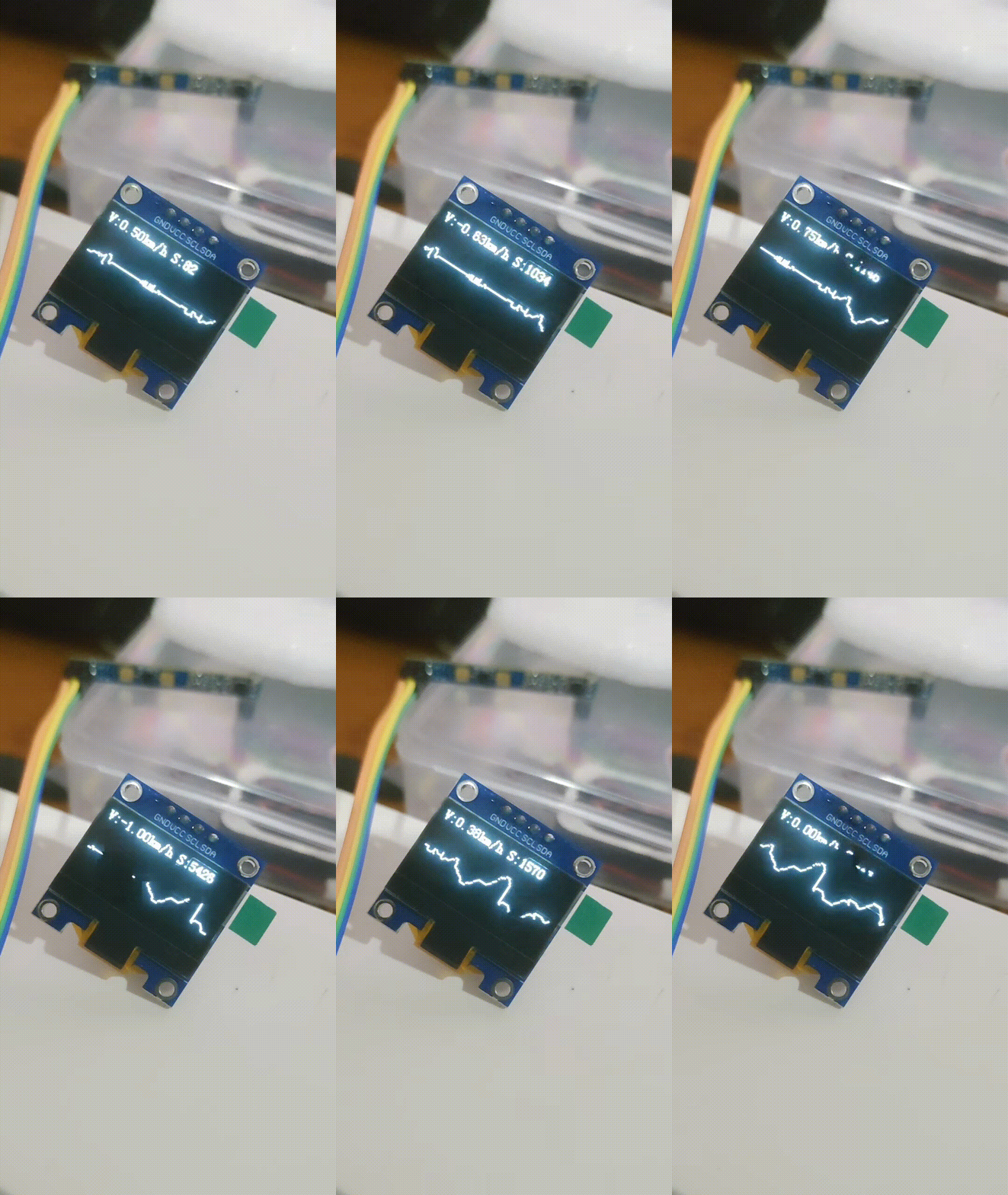
演示