
 开源社区
开源社区 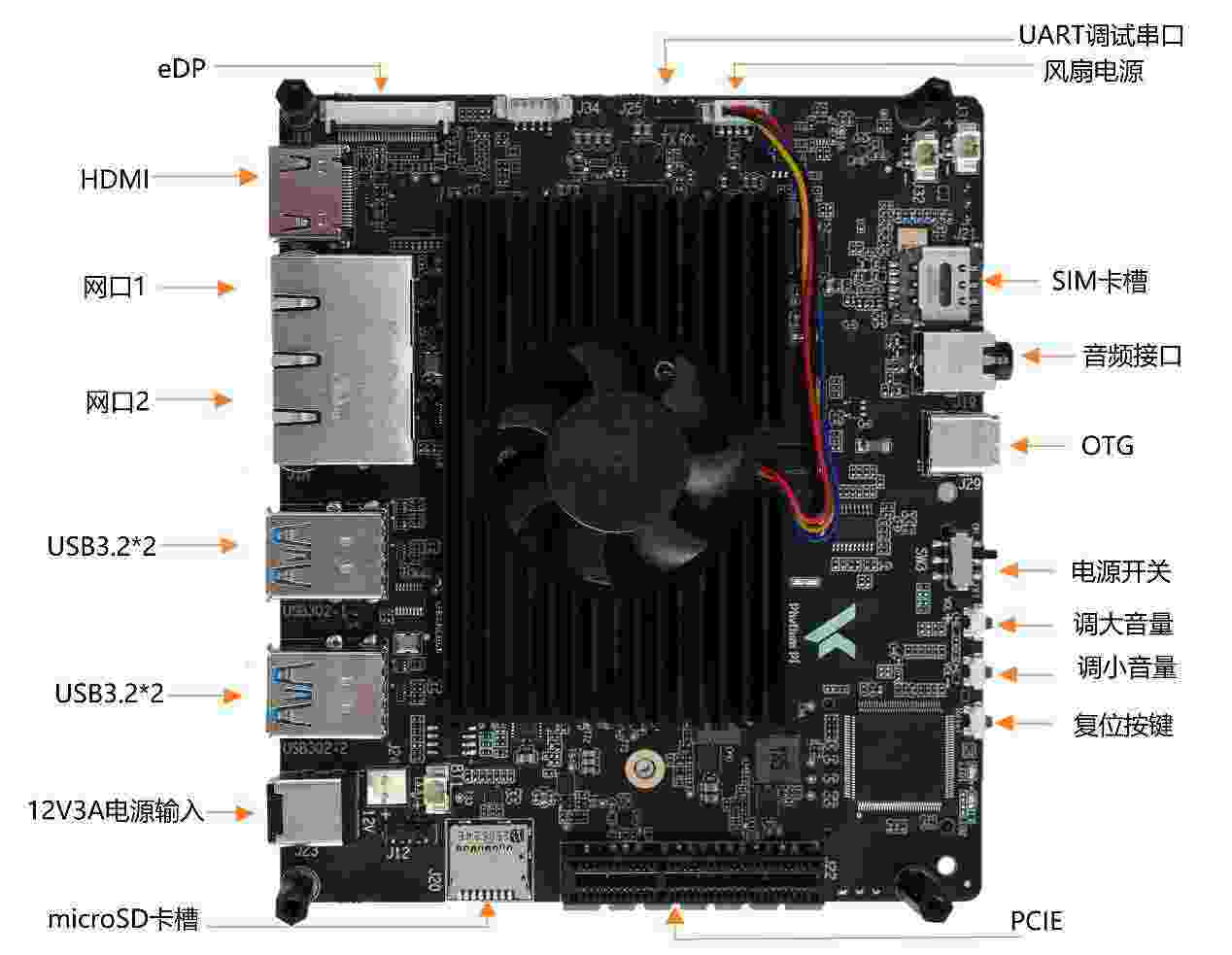
飞腾派PRO作为采用国产自主研发的嵌入式处理器的全国产“派”,欲在工业生产落地应用,关于机器视觉的应用是绕不开的,因此本文章将带来飞腾派PRO的机器视觉能力人脸识别测试。

准备阶段
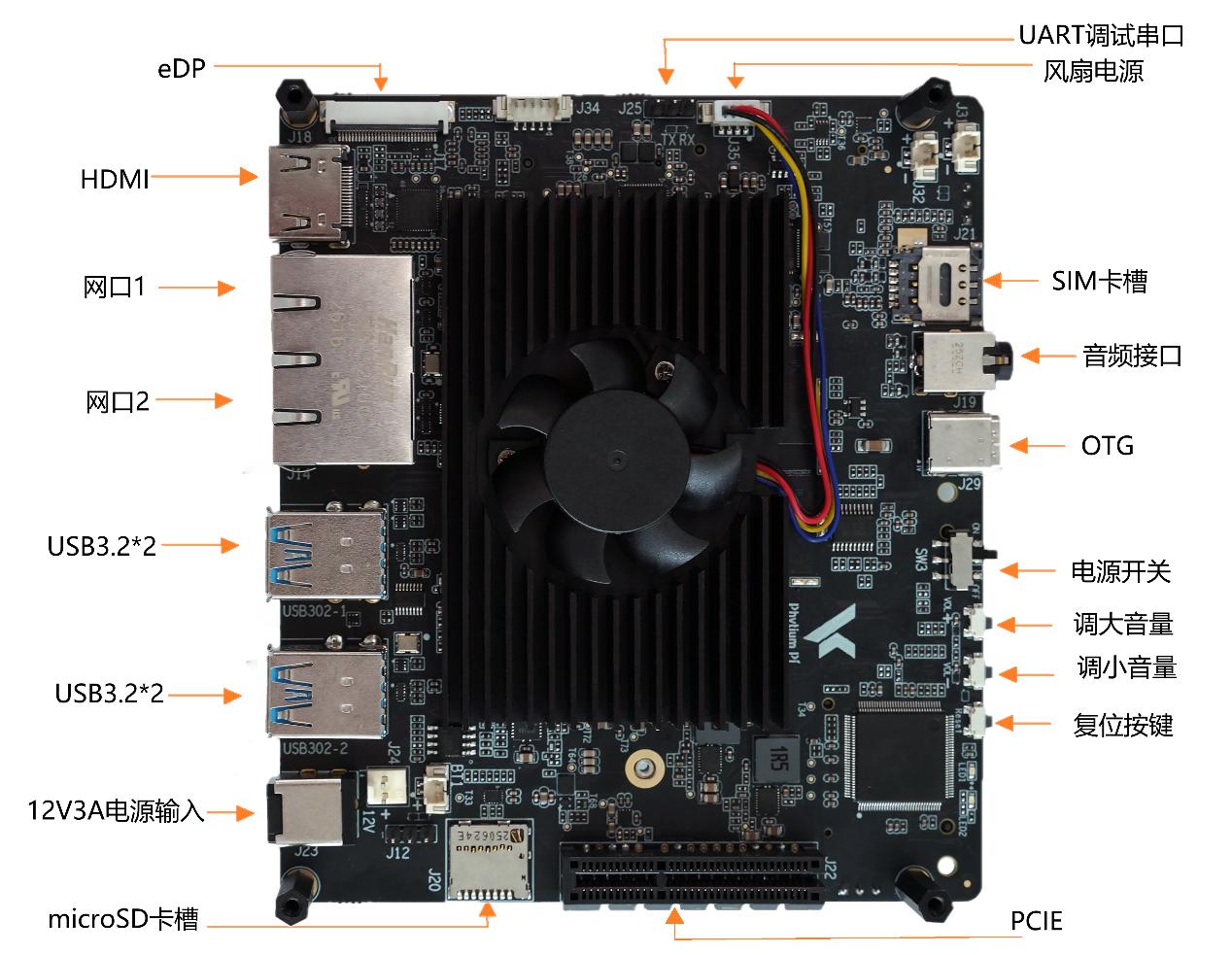
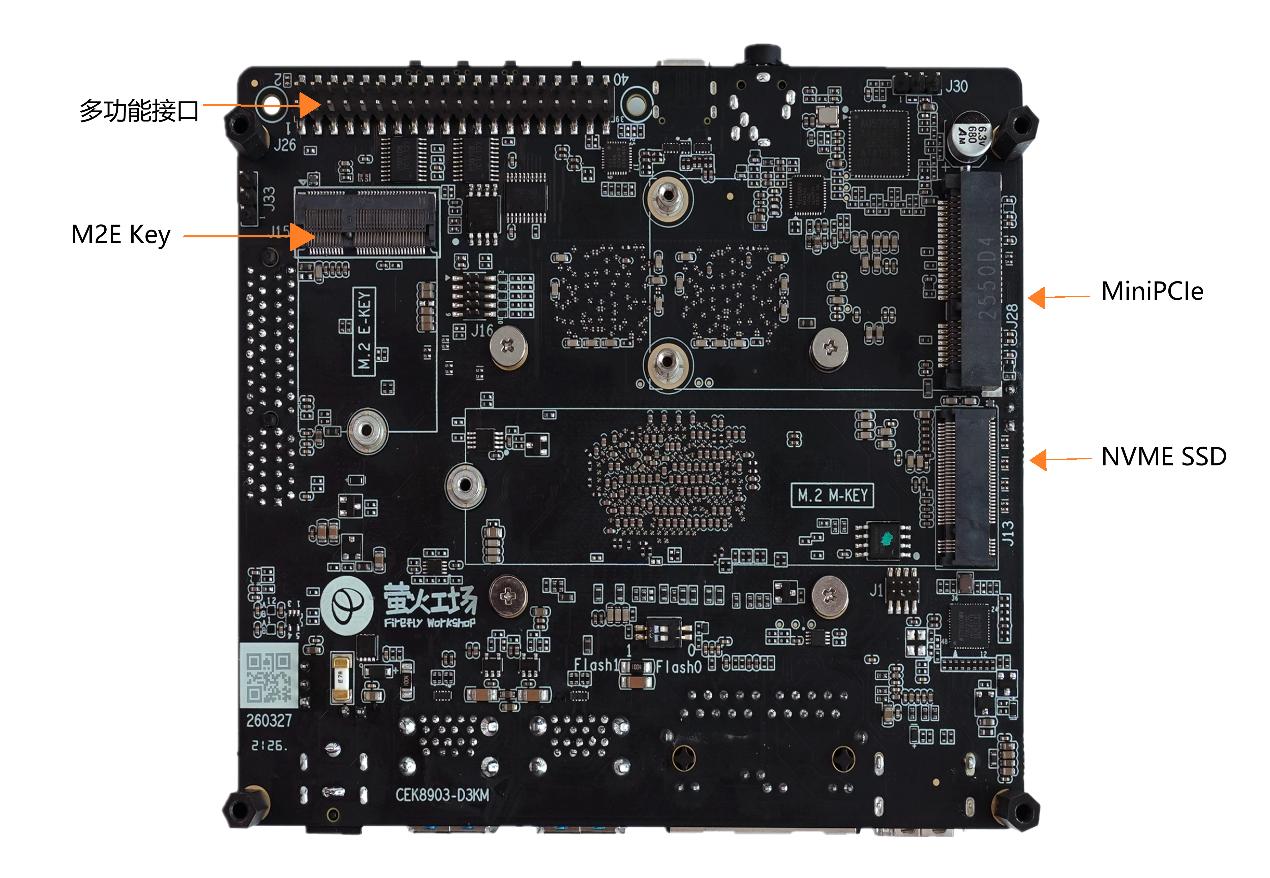
飞腾派PRO在使用之前都需要准备一块足够容量的SSD固态,并将系统镜像烧入到SSD中,以启动“派”,飞腾派PRO支持多种操作系统例如操作Ubuntu、Debian、Yocto、OpenKylin、OpenHarmony等开源操作系统,本次评测选用基于Debian11的飞腾派PROOS作为主要开发系统。
设置编译器
$ export PATH=$PATH:${YOUR_PATH}/riscv/bin
$ export CC=riscv64-unknown-linux-gnu-gcc
$ export CXX=riscv64-unknown-linux-gnu-g++
模型部分
MNN的使用较为简单,使用方法类似TensorFlow 1.x,简要的流程为:
// 创建会话createSession();// 设置输入getSessionInput();// 运行会话runSession();// 获取输出getSessionOutput();
| // 创建会话createSession();// 设置输入getSessionInput();// 运行会话runSession();// 获取输出getSessionOutput(); #include <iostream>#include <vector>#include <cmath>#include <algorithm>#include <opencv2/opencv.hpp>#include <MNN/Interpreter.hpp>#include <MNN/Tensor.hpp>#include <MNN/ImageProcess.hpp> // 定义人脸框结构struct FaceBox { float x1, y1, x2, y2; float score;}; // UltraFace RFB-320 超参数const int INPUT_WIDTH = 320;const int INPUT_HEIGHT = 240;const float MEAN_VALS[] = {127.0f, 127.0f, 127.0f};const float NORM_VALS[] = {1.0/128.0f, 1.0/128.0f, 1.0/128.0f};const float CONFIDENCE_THRESHOLD = 0.6f;const float NMS_THRESHOLD = 0.3f; // Prior Box 结构struct PriorBox { float cx, cy, w, h;}; // 非极大值抑制 (NMS)void nms(std::vector<FaceBox>& boxes, float threshold) { std::sort(boxes.begin(), boxes.end(), [](const FaceBox& a, const FaceBox& b) { return a.score > b.score; }); std::vector<bool> suppressed(boxes.size(), false); for (size_t i = 0; i < boxes.size(); ++i) { if (suppressed[i]) continue; for (size_t j = i + 1; j < boxes.size(); ++j) { if (suppressed[j]) continue; float xx1 = std::max(boxes[i].x1, boxes[j].x1); float yy1 = std::max(boxes[i].y1, boxes[j].y1); float xx2 = std::min(boxes[i].x2, boxes[j].x2); float yy2 = std::min(boxes[i].y2, boxes[j].y2); float w = std::max(0.0f, xx2 - xx1); float h = std::max(0.0f, yy2 - yy1); float area_i = (boxes[i].x2 - boxes[i].x1) * (boxes[i].y2 - boxes[i].y1); float area_j = (boxes[j].x2 - boxes[j].x1) * (boxes[j].y2 - boxes[j].y1); float overlap = w * h; float iou = overlap / (area_i + area_j - overlap); if (iou > threshold) { suppressed[j] = true; } } } std::vector<FaceBox> result; for (size_t i = 0; i < boxes.size(); ++i) { if (!suppressed[i]) { result.push_back(boxes[i]); } } boxes = result;} // 生成 Prior Boxes (RFB-320 特定配置)std::vector<PriorBox> generate_priors() { std::vector<PriorBox> priors; // RFB-320 配置: min_sizes, steps, feature_map_sizes // 注意:不同版本的 UltraFace 可能略有差异,需根据实际模型调整 const std::vector<std::vector<float>> min_sizes = { {10.0f, 16.0f, 24.0f}, {32.0f, 48.0f}, {64.0f, 96.0f}, {128.0f, 192.0f, 256.0f} }; const std::vector<int> steps = {8, 16, 32, 64}; const std::vector<int> feature_map_widths = {40, 20, 10, 5}; const std::vector<int> feature_map_heights = {30, 15, 8, 4}; for (size_t k = 0; k < min_sizes.size(); ++k) { int feat_w = feature_map_widths[k]; int feat_h = feature_map_heights[k]; int step = steps[k]; for (int i = 0; i < feat_h; ++i) { for (int j = 0; j < feat_w; ++j) { for (float min_size : min_sizes[k]) { float cx = (j + 0.5f) * step / 320.0f; float cy = (i + 0.5f) * step / 240.0f; float w = min_size / 320.0f; float h = min_size / 240.0f; priors.push_back({cx, cy, w, h}); } } } } return priors;} class UltraFaceDetector {public: bool init(const std::string& model_path) { // 1. 创建 Interpreter interpreter_ = std::unique_ptr<MNN::Interpreter>(MNN::Interpreter::createFromFile(model_path.c_str())); if (!interpreter_) { std::cerr << "Failed to load model: " << model_path << std::endl; return false; } // 2. 配置 Schedule MNN::ScheduleConfig config; config.type = MNN_FORWARD_CPU; config.numThread = 4; // 3. 创建 Session session_ = interpreter_->createSession(config); // 4. 预生成 Prior Boxes priors_ = generate_priors(); return true; } std::vector<FaceBox> detect(const cv::Mat& image) { if (image.empty()) return {}; // 1. 预处理:Resize cv::Mat resized_img; cv::resize(image, resized_img, cv::Size(INPUT_WIDTH, INPUT_HEIGHT)); auto input_tensor = interpreter_->getSessionInput(session_, nullptr); // 2. 图像转换与归一化 (MNN CV Module) MNN::CV::ImageProcess::Config config; config.sourceFormat = MNN::CV::BGR; config.destFormat = MNN::CV::RGB; config.filterType = MNN::CV::BILINEAR; memcpy(config.mean, MEAN_VALS, sizeof(MEAN_VALS)); memcpy(config.normal, NORM_VALS, sizeof(NORM_VALS)); std::shared_ptr<MNN::CV::ImageProcess> process(MNN::CV::ImageProcess::create(config)); process->convert((uint8_t*)resized_img.data, resized_img.cols, resized_img.rows, resized_img.step, input_tensor); // 3. 推理 interpreter_->runSession(session_); // 4. 获取输出 (MNN 2.0 方式) auto scores_tensor = interpreter_->getSessionOutput(session_, "scores"); auto boxes_tensor = interpreter_->getSessionOutput(session_, "boxes"); if (!scores_tensor || !boxes_tensor) { std::cerr << "Failed to get output tensors." << std::endl; return {}; } // 【关键】MNN 2.0 推荐直接使用 host() 指针,避免额外拷贝 const float* scores_data = scores_tensor->host<float>(); const float* boxes_data = boxes_tensor->host<float>(); if (!scores_data || !boxes_data) { std::cerr << "Failed to access host data." << std::endl; return {}; } // 5. 后处理:SSD 解码 std::vector<FaceBox> valid_boxes; int num_boxes = scores_tensor->elementSize() / 2; float scale_w = static_cast<float>(image.cols) / INPUT_WIDTH; float scale_h = static_cast<float>(image.rows) / INPUT_HEIGHT; const std::vector<float> variances = {0.1f, 0.2f}; for (int i = 0; i < num_boxes; ++i) { float score = scores_data[i * 2 + 1]; if (score > CONFIDENCE_THRESHOLD) { const auto& prior = priors_[i]; float dx = boxes_data[i * 4 + 0]; float dy = boxes_data[i * 4 + 1]; float dw = boxes_data[i * 4 + 2]; float dh = boxes_data[i * 4 + 3]; // 使用 variances[0] 处理中心点偏移 (dx, dy) // 使用 variances[1] 处理宽高偏移 (dw, dh) float cx = prior.cx + dx * variances[0] * prior.w; float cy = prior.cy + dy * variances[0] * prior.h; float w = prior.w * std::exp(dw * variances[1]); float h = prior.h * std::exp(dh * variances[1]); float x1 = (cx - w / 2.0f) * INPUT_WIDTH * scale_w; float y1 = (cy - h / 2.0f) * INPUT_HEIGHT * scale_h; float x2 = (cx + w / 2.0f) * INPUT_WIDTH * scale_w; float y2 = (cy + h / 2.0f) * INPUT_HEIGHT * scale_h; // 边界裁剪 x1 = std::max(0.0f, x1); y1 = std::max(0.0f, y1); x2 = std::min(static_cast<float>(image.cols), x2); y2 = std::min(static_cast<float>(image.rows), y2); if (x2 > x1 && y2 > y1) { valid_boxes.push_back({x1, y1, x2, y2, score}); } } } // 6. NMS nms(valid_boxes, NMS_THRESHOLD); return valid_boxes; } private: std::unique_ptr<MNN::Interpreter> interpreter_; MNN::Session* session_ = nullptr; std::vector<PriorBox> priors_;}; int main() { UltraFaceDetector detector; // 确保 ultraface_rfb_320.mnn 在当前目录或使用绝对路径 if (!detector.init("ultraface_rfb_320.mnn")) { return -1; } cv::Mat img = cv::imread("test.jpg"); if (img.empty()) { std::cerr << "Could not open image." << std::endl; return -1; } auto faces = detector.detect(img); std::cout << "Detected " << faces.size() << " faces." << std::endl; for (const auto& face : faces) { cv::rectangle(img, cv::Point(static_cast<int>(face.x1), static_cast<int>(face.y1)), cv::Point(static_cast<int>(face.x2), static_cast<int>(face.y2)), cv::Scalar(0, 255, 0), 2); std::string label = "Face: " + std::to_string(face.score).substr(0, 4); cv::putText(img, label, cv::Point(static_cast<int>(face.x1), static_cast<int>(face.y1) - 10), cv::FONT_HERSHEY_SIMPLEX, 0.5, cv::Scalar(0, 255, 0), 1); } cv::imshow("UltraFace Detection", img); cv::waitKey(0); return 0;} |


看起来运行效果相当不错,仅需22ms左右即可完成推理!